L293D MOTOR DRIVER IC & PROJECT
L293D MOTOR DRIVER IC
L293D IC is known as a motor driver. It is a low voltage operating device. It provides a high voltage to the motor unlike other IC’s. L293D provides the continuous bidirectional Direct Current to the Motor. The Polarity of current can change at any time without affecting the whole IC or any other device in the circuit. L293d has an internal H-bridge installed for two motors.
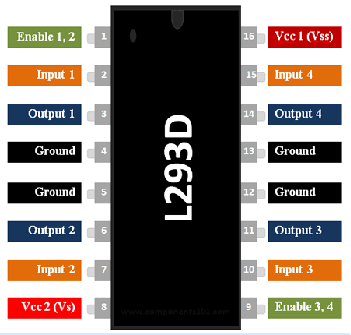
H-Bridge is an electrical circuit that enables the load in a bidirectional way. It could control any DC motor speed and direction with a voltage range of 4.5 – 36 Volts. Its diodes also save the controlling device and IC from back EMF. To control the max 600mA amount of current an internal “Darlington Transistor Sink” installed in it, which could be used to control a large amount of current by
providing a small amount of current. It has also internal “pseudo-Darlington source” which amplifies the input signal to control the high voltage DC motor without any interception.

ADVANTAGES OF L293D IC :-
- L293D could be used to control two motors simultaneously.
- It has the ability to control the speed by using the enable pin.
- Change direction easily.
- Voltage supply range is higher than other IC. Voltage range between 4.5-36 volts can easily handle by the IC to the motor.
- The motor has a maximum continuous range of current close to 600mA but the maximum peak current range is 1.2A.
- It has an automatic shutdown system on thermal condition.
- Its working range is from 0 – 70 degree celcius which is much higher for any small-sized IC.
- It has an internal back emp protection for IC and the controlling device.
APPLICATIONS OF L293D IC:-
The L293D is a popular 16-Pin Motor Driver IC. As the name suggests it is mainly used to drive motors. A single L293D IC is capable of running two DC motors at the same time; also the direction of these two motors can be controlled independently. So if you have motors which has operating voltage less than 36V and operating current less than 600mA, which are to be controlled by digital circuits like Op-Amp, 555 timers, digital gates or even Microcontrollers like Arduino, PIC, ARM etc.. this IC will be the right choice for you.
- Today, similar IC's are used in Electric Vehicles for controlling motors.
- DC motor drivers.
- Relay drivers.
- Stepper motor drivers.

_
MINI-PROJECT USING L293D
FOR PROJECT PPT:- https://www.mediafire.com/file/mdzqzsjy8lmg8ff/Mini-project_ppt_2.0.pptx/fileAIM:-
REQUIREMENTS / QTY:-

LINK / DOWNLOAD(for better view):
PREREQUISITES:-
- Should know the basics of IC's.
- Know ARDUINO / MICRO-CONTROLLER PROGRAMMING.
- Basic understanding of electronic components.
- Basic understanding of circuits.
CIRCUIT DIAGRAM:-

LINK / DOWNLOAD(for better view):
CIRCUIT REPRESENTATION:-

LINK / DOWNLOAD(for better view):
FOR PERFORMING THE SIMULATION:-
SOURCE CODE:-
https://www.mediafire.com/file/9j5h2ekm424vztb/L293D_CODE.txt/file
#define in_1 2
#define in_2 3
#define in_3 4
#define in_4 5
#define ledR 11
#define ledB 9
#define ledG 6
#define buzz 10
void setup()
{
pinMode(in_1, OUTPUT);
pinMode(in_2, OUTPUT);
pinMode(in_3, OUTPUT);
pinMode(in_4, OUTPUT);
pinMode(ledR, OUTPUT);
pinMode(ledG, OUTPUT);
pinMode(ledB, OUTPUT);
pinMode(buzz, OUTPUT);
}
void loop()
{
//forward
digitalWrite(in_1, HIGH);
digitalWrite(in_2,LOW);
digitalWrite(in_3, HIGH);
digitalWrite(in_4, LOW);
analogWrite(ledB, 200);
delay(3000);
digitalWrite(in_1, LOW);
digitalWrite(in_3, LOW);
delay(1000);
digitalWrite(ledB, LOW);
delay(2000);
//backward
digitalWrite(in_1, LOW);
digitalWrite(in_2, HIGH);
digitalWrite(in_3, LOW);
digitalWrite(in_4, HIGH);
digitalWrite(ledR, HIGH);
//BUZZER TONE CODE
int i=0;
do{
i++;
tone(buzz, 600);
delay(500);
noTone(buzz);
delay(500);
}
while(i<5);
delay(1000);
digitalWrite(in_2,LOW);
digitalWrite(in_4, LOW);
delay(2000);
digitalWrite(ledR, LOW);
delay(2000);
//left
digitalWrite(in_1, LOW);
digitalWrite(in_2,LOW);
digitalWrite(in_3, HIGH);
digitalWrite(in_4, LOW);
analogWrite(ledG, 200);
delay(5000);
digitalWrite(in_3, LOW);
delay(1000);
digitalWrite(ledG, LOW);
delay(2000);
//right
digitalWrite(in_1, HIGH);
digitalWrite(in_2,LOW);
digitalWrite(in_3, LOW);
digitalWrite(in_4, LOW);
analogWrite(ledG, 200);
analogWrite(ledR, 200);
delay(5000);
digitalWrite(in_1, LOW);
delay(1000);
digitalWrite(ledG, LOW);
digitalWrite(ledR, LOW);
delay(2000);
//stop
digitalWrite(in_1, LOW);
digitalWrite(in_2,LOW);
digitalWrite(in_3, LOW);
digitalWrite(in_4, LOW);
digitalWrite(ledR, HIGH);
analogWrite(buzz, 500);
tone(buzz, 600);
delay(2000);
noTone(buzz);
digitalWrite(ledR, LOW);
delay(7000);
}
Comments
Post a Comment